 QuiddityML
Loss is NaN: the common causes and fixes
A loss that turns into NaN usually comes from a log of zero, an exponential that overflows, or a division by zero. This post shows how to catch the NaN on the step it appears, find the layer that produced it, and fix each common cause in PyTorch.
A NaN loss means the number your training loop is trying to minimize has become NaN, short for "Not a Number", the value a computer produces when arithmetic has no defined answer, such as zero divided by zero. Once it shows up, the model stops learning while the loop keeps running and printing nan, so the useful questions are when it first appeared and which operation made it. In practice the answer is usually one of a few things: a log of zero, an exponential too large to store, or a division by a variance of zero.
Why one NaN breaks the whole run
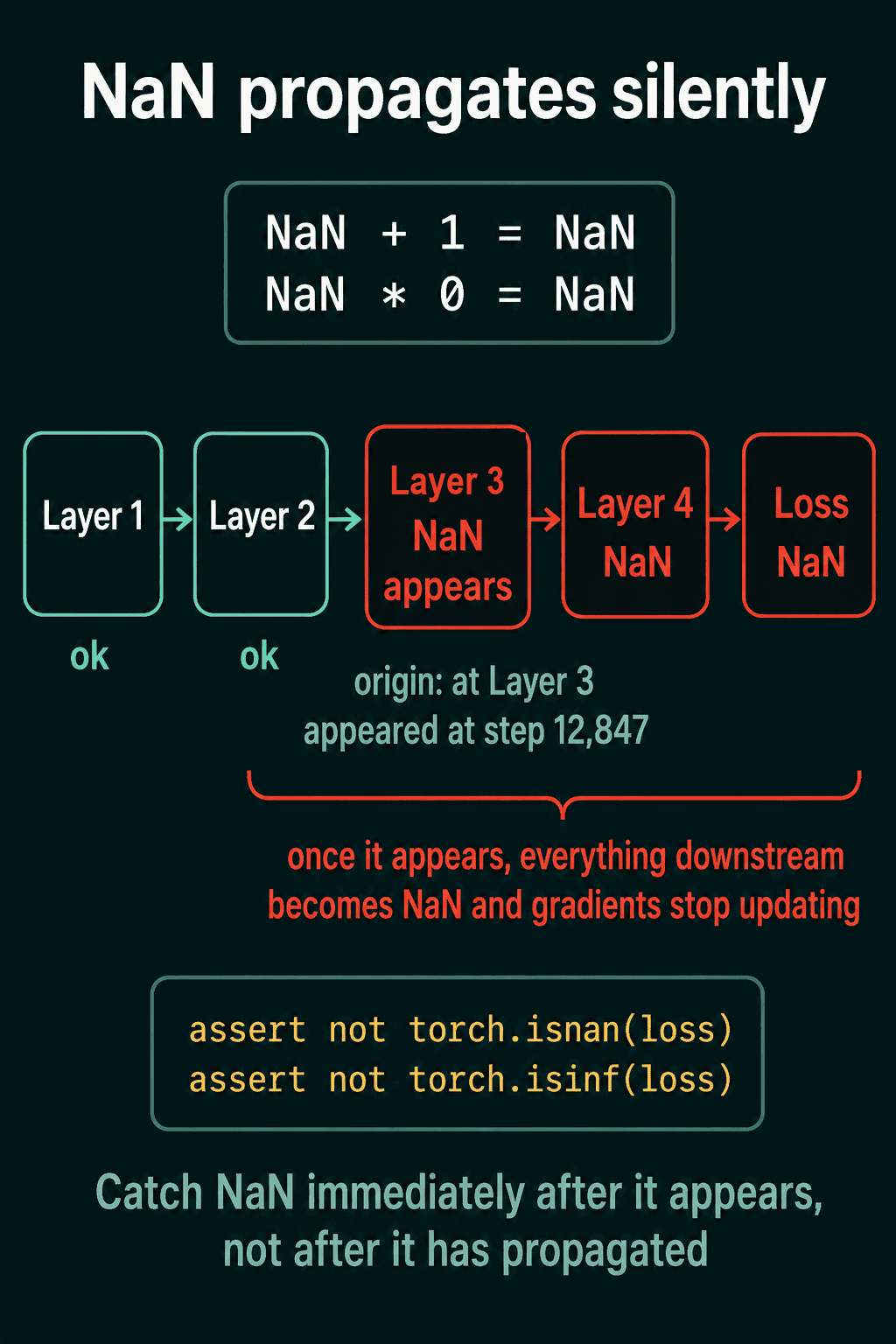
Any arithmetic that involves a NaN gives NaN back, and a few operations on infinity create a fresh NaN:
import torch
nan = torch.tensor(float("nan"))
inf = torch.tensor(float("inf"))
print(nan + 1, nan * 0, 0 * -inf) # tensor(nan) tensor(nan) tensor(nan)A NaN produced in one layer turns the output of each later layer into NaN, and then the loss. By the time you notice NaN in the loss, it may have come from a step much earlier, especially if you look at the loss once every few hundred steps. And once the loss is NaN, the gradients computed from it are NaN too, so the weights stop getting useful updates while training keeps running with no error message.
Catch the NaN on the step it appears
PyTorch does not stop on a NaN by itself, so the first fix is a check right after the loss is computed. torch.isnan returns True for a NaN, and torch.isinf returns True for positive or negative infinity:
import torch
import torch.nn as nn
loss_fn = nn.MSELoss()
y_hat = torch.tensor([1.0, float("nan")]) # one prediction already went bad
y = torch.tensor([1.0, 2.0])
step = 0
loss = loss_fn(y_hat, y)
assert not torch.isnan(loss), f"Loss is NaN at step {step}" # AssertionError: Loss is NaN at step 0
assert not torch.isinf(loss), f"Loss is Inf at step {step}"In a training loop, put the check before loss.backward(). Calling backward() on a NaN loss fills each parameter's .grad with NaN before the check fires, and the step number you report should be the one where the NaN appeared.
Common sources of NaN
log(0) in a hand-written cross-entropy
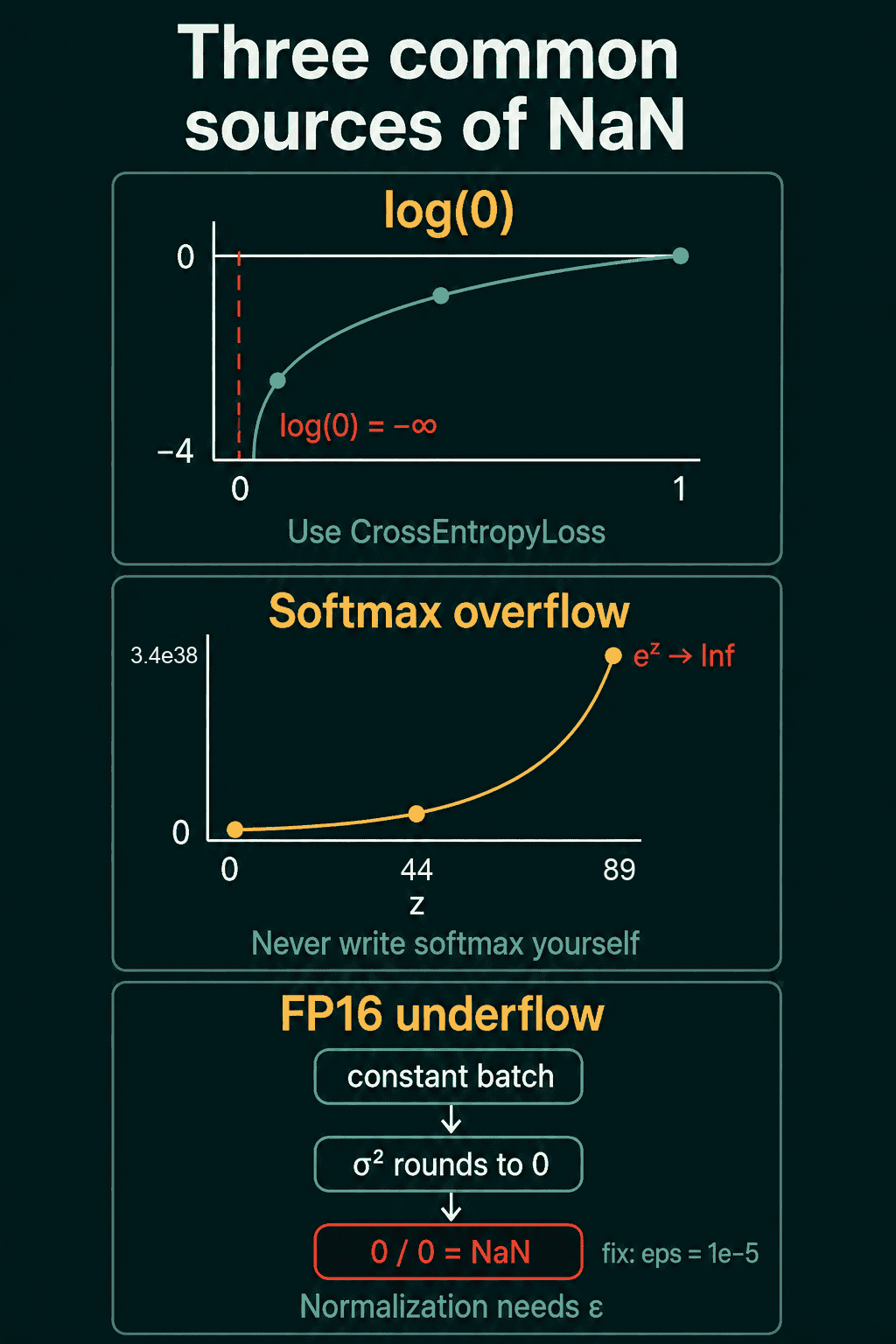
Cross-entropy is the usual loss for classification. The model outputs logits, one raw score per class, softmax turns them into probabilities that sum to 1, and the loss is the negative log of the probability given to the true class. Written by hand, it often looks like -(y * torch.log(probs)).sum(), with y a one-hot label (1 for the true class, 0 elsewhere). If any probability is exactly 0, log(0) is negative infinity. On a class whose label is 0 that term becomes 0 * -inf, which is NaN, and on the true class the loss becomes infinite.
import torch
import torch.nn as nn
logits = torch.tensor([[0.0, -200.0]]) # the model is very sure of class 0
y = torch.tensor([[1.0, 0.0]]) # one-hot label: class 0
probs = torch.softmax(logits, dim=1)
print(probs) # tensor([[1., 0.]]): exp(-200) rounds to 0
manual = -(y * torch.log(probs)).sum() # 0 * log(0) = 0 * -inf = NaN
print(manual) # tensor(nan)
builtin = nn.CrossEntropyLoss()(logits, torch.tensor([0])) # takes raw logits
print(builtin) # tensor(0.)The fix is to pass logits straight to nn.CrossEntropyLoss for several classes, or nn.BCEWithLogitsLoss for two, and let them handle the numerical stability internally.
Softmax overflow
Softmax exponentiates each logit, written $e^z$ for a logit $z$, and divides by the sum. A 32-bit float tops out around $3.4 \times 10^{38}$, which $e^z$ passes once $z$ is above about 89, so $e^{100}$ does not fit and becomes infinity, and infinity divided by infinity is NaN:
import torch
def my_softmax(z):
e = torch.exp(z)
return e / e.sum()
z = torch.tensor([100.0, 0.0])
print(torch.exp(z)) # tensor([inf, 1.])
print(my_softmax(z)) # tensor([nan, 0.])
print(torch.softmax(z, dim=0)) # tensor([1.0000e+00, 3.7835e-44])PyTorch's built-in softmax uses the log-sum-exp trick: it subtracts the largest logit from each logit before exponentiating, which leaves the result unchanged and keeps each exponent at or below $e^0 = 1$. Use torch.softmax or the logits-based losses above instead of writing your own.
Division by zero in normalization
Normalization layers subtract a mean and divide by a standard deviation (the square root of the variance) or a norm. If the batch is constant, the variance is exactly 0 and the division is $0/0$. Half precision (FP16, 16-bit floats) makes this more likely, because values below about $3 \times 10^{-8}$ round to zero, so a tiny variance can become a zero one:
import torch
print(torch.tensor(1e-8, dtype=torch.float16)) # tensor(0., dtype=torch.float16)
x = torch.full((4, 3), 2.5) # a constant batch
var = x.var(dim=0, unbiased=False)
print((x - x.mean(dim=0)) / torch.sqrt(var)) # 4x3 tensor of nan
print((x - x.mean(dim=0)) / torch.sqrt(var + 1e-5)) # 4x3 tensor of 0.That is why normalization layers add a small epsilon, $\epsilon$, to the variance in the denominator. PyTorch's normalization layers default to eps=1e-5, which is usually fine in FP16 too. A hand-written normalization with no epsilon produces NaN the first time a batch comes out constant.
Exploding gradients
Gradients that grow from step to step make each weight update larger than the last, until a weight or activation overflows to infinity and the next operation on it gives NaN. Gradient clipping, which caps how large a gradient is allowed to get before the update, stops that growth before it reaches NaN. Clipping does nothing for a log(0) or a division by zero in the forward pass, which is why it is worth finding the source before picking a fix.
Reproducing a NaN and fixing it
The script below trains a small network that contains a hand-written normalization layer with no epsilon. Batch 3 has 16 identical rows, so the variance inside that layer is 0:
import torch
import torch.nn as nn
class ManualNorm(nn.Module):
"""Subtract the batch mean, divide by the batch standard deviation."""
def __init__(self, eps=0.0):
super().__init__()
self.eps = eps
def forward(self, x):
var = x.var(dim=0, unbiased=False)
return (x - x.mean(dim=0)) / torch.sqrt(var + self.eps)
def make_model(eps):
torch.manual_seed(0)
return nn.Sequential(nn.Linear(3, 8), ManualNorm(eps), nn.ReLU(), nn.Linear(8, 1))
torch.manual_seed(1)
batches = [(torch.randn(16, 3), torch.randn(16, 1)) for _ in range(5)]
batches[3] = (torch.ones(16, 3), torch.randn(16, 1)) # every row identical
def train(model):
optimizer = torch.optim.SGD(model.parameters(), lr=0.01)
loss_fn = nn.MSELoss()
for step, (x, y) in enumerate(batches):
optimizer.zero_grad()
loss = loss_fn(model(x), y)
assert not torch.isnan(loss), f"Loss is NaN at step {step}"
assert not torch.isinf(loss), f"Loss is Inf at step {step}"
loss.backward()
optimizer.step()
print(f"step {step}: loss {loss.item():.4f}")
try:
train(make_model(eps=0.0))
except AssertionError as e:
print(e)
train(make_model(eps=1e-5))step 0: loss 2.0995
step 1: loss 1.6835
step 2: loss 1.2752
Loss is NaN at step 3
step 0: loss 2.0995
step 1: loss 1.6834
step 2: loss 1.2752
step 3: loss 0.6065
step 4: loss 1.2743Without epsilon the check stops the run at step 3, the first step that sees the constant batch. With eps=1e-5 the same batch normalizes to zeros and training continues.
Finding the layer that produced the NaN
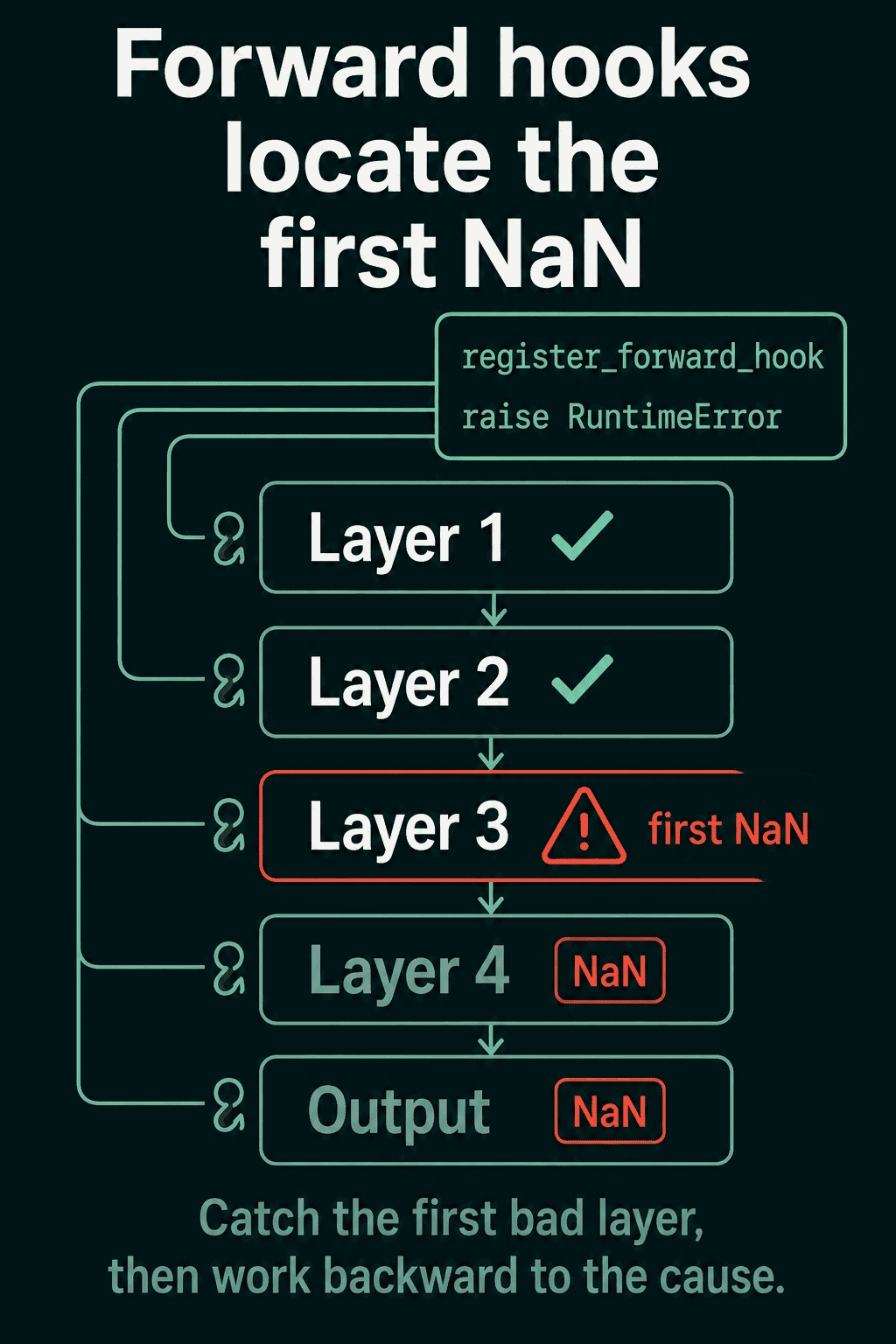
The check says when the NaN appeared, not where. A forward hook is a function PyTorch calls with a module's output each time that module runs. Registering one on each module that raises on the first NaN output gives you the name of the layer where it started. Continuing the script above:
model = make_model(eps=0.0)
x, y = batches[3]
def nan_hook(module, input, output):
if isinstance(output, torch.Tensor) and torch.isnan(output).any():
raise RuntimeError(f"NaN detected in {module.__class__.__name__}")
hooks = [m.register_forward_hook(nan_hook) for m in model.modules()]
try:
model(x)
except RuntimeError as e:
print(e) # NaN detected in ManualNorm
finally:
for h in hooks:
h.remove()From that layer, work backward to the cause, here a variance of 0 with no epsilon.
PyTorch also has a built-in check, torch.autograd.detect_anomaly(). Wrapping the forward pass, loss, and backward() in it makes PyTorch raise an error with a stack trace when the backward pass produces a NaN or infinity. It slows training down a lot, so turn it on to debug one specific NaN and remove it afterwards. If neither the hooks nor anomaly detection point at the source, comment out half the layers, check whether the NaN still appears, and keep halving the half that contains it.
Checking gradient flow
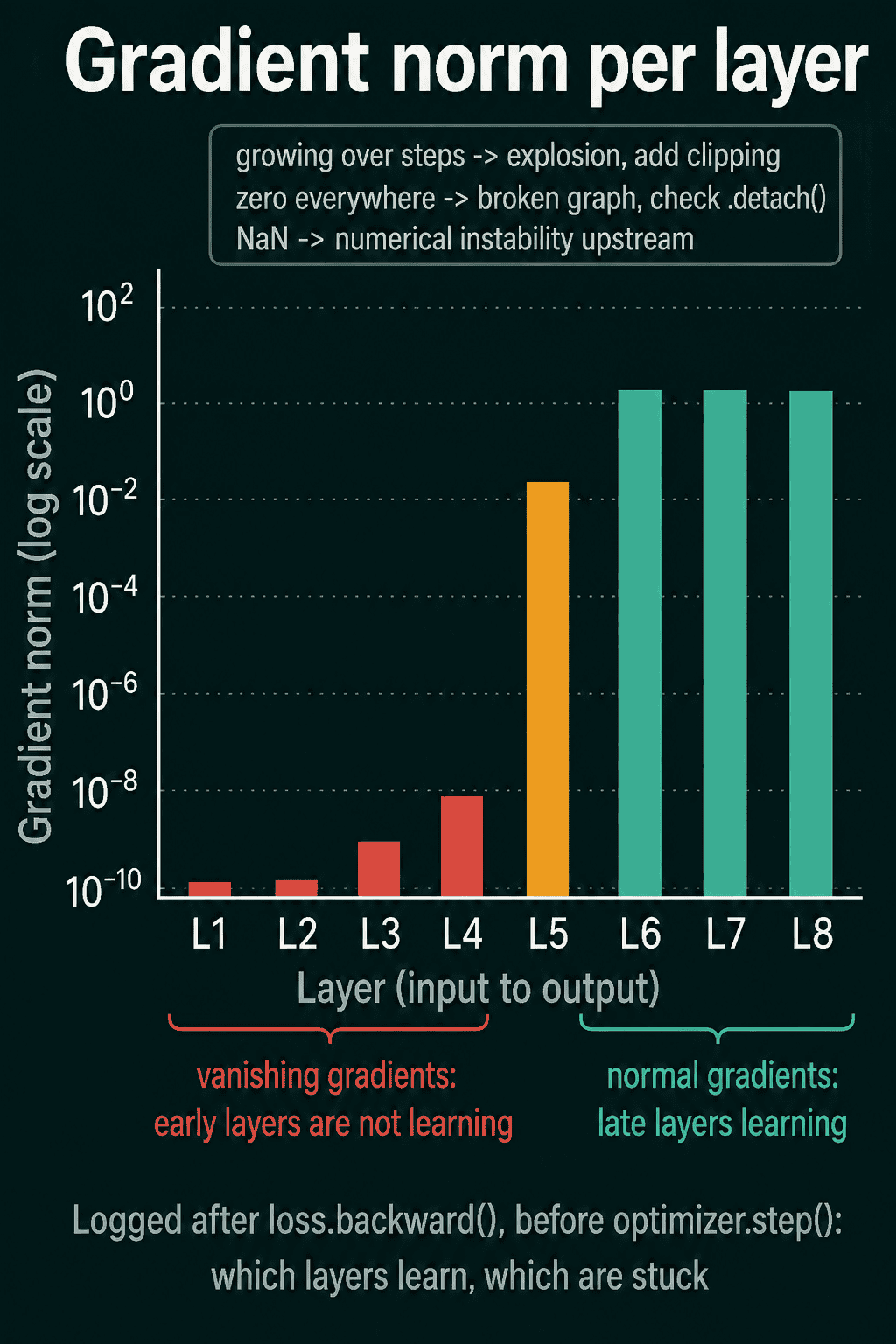
NaN gradients are one of several problems that a loss curve alone does not explain. The gradient norm of a parameter is the size of its gradient as one number, the square root of the sum of its squared entries. Logging it for each layer after loss.backward() and before optimizer.step() shows which layers are getting a useful update. On the bad batch from the script above:
loss = nn.MSELoss()(model(x), y)
loss.backward()
for name, param in model.named_parameters():
if param.grad is not None:
print(f"{name}: grad_norm = {param.grad.norm().item():.6f}")0.weight: grad_norm = nan
0.bias: grad_norm = nan
3.weight: grad_norm = nan
3.bias: grad_norm = nanEach layer's gradient is NaN, so an optimizer step on this batch would write NaN into each weight. The four patterns to look for in these logs:
- Near zero in the early layers, normal in the later ones. These are vanishing gradients: the gradient shrinks as it travels back toward the input, so the early layers barely change.
- Norms that grow over training steps. Gradient explosion is starting. Add gradient clipping before it becomes NaN.
- Zero in each layer. Something in the forward pass cut the path the gradient flows back through, often a misplaced
.detach()or.numpy()call. - NaN. Something upstream is numerically unstable, so go back to the source-finding steps above.
Common mistakes
- Checking after
backward(). The NaN check belongs between the loss andloss.backward(), so a bad batch does not fill the gradients with NaN. - Fixing before finding. Lowering the learning rate or clipping gradients helps when an update blew up, and does nothing for a
log(0)or a division by zero. Find the layer first. - Leaving anomaly detection on.
detect_anomalyis a debugging tool, and keeping it in a normal training loop costs a lot of speed. - Writing your own softmax, cross-entropy, or normalization. The built-in versions handle the overflow,
log(0), and epsilon cases above.
Related concepts
If the loss is a number but stays flat instead of turning into NaN, the causes are different, and the loss-not-decreasing checklist goes through them. Vanishing and exploding gradients, and how clipping works, get their own post in vanishing and exploding gradients. How softmax turns logits into probabilities is covered in softmax explained.
QuiddityML teaches NaN debugging and gradient flow as two concepts in the ML Foundation track, and the exercises on them include spotting the loss.backward() that runs before the NaN check, predicting what happens when the targets contain NaN, and writing a training loop that logs each layer's gradient norm from scratch.